2013: Happy New Year!

January 1, 2013 // 6 comments


I don't know what it is about the end of the year but everyone generally seems to feel pressured to go out with a bang; out with the old, in with the new all the while insisting this will be my year! We all have new hopes, dreams, and resolutions. We are hoping not to repeat disappointments from the previous year and looking forward to what is to come of this one. Gyms will be crowded and Wal-Mart will be out of organic produce for the first month or so as the lazy are weeded out and the motivated are brought to the forefront.

My resolutions are a lot like AT&T's rollover minutes. They just keep going, rolling over to the next year as I hope that, one of these days, they'll work out like I want them to. I'd like to lose weight (who doesn't?), become a more attentive parent (I still struggle with this), become a better blogger, focus on marketing my design services, and keep a more organized home. These things, however, aren't just things I want to accomplish this year. These are all things that I not only hope to accomplish, but also continue to improve every day, every month, every year. But if I was being really honest, I don't feel all that excited about the new year. I feel more like my life is passing me by and I'm just watching my own future regrets. I've been feeling lately like I need to do something out of my comfort zone to create more excitement and adventure for myself. I have a strong desire to move away from the area I've called home for 25 years. I'm not getting any younger, things are not going the way I wish they would, and this is definitely not where I say myself in my mid-20s. Now I just have to find the balls to do what I need (want) to do.

If you're a regular visitor, you may have noticed a few changes around here. I took a much needed break which left me feeling refreshed and inspired. I spent those two months really thinking about where I wanted to go and grow as a blogger and a designer. I also spent a lot of time working with Lindsay to re-brand and re-launch Poppy Magazine. I somehow stumbled upon a post that they were looking for a Web Designer and I happily volunteered myself for the position and was so excited when Lindsay contacted me to join the team. I read the first issue of the magazine the day it came out and fell in love with it. These ladies really know what they are doing and they have spent a lot of time writing and curating content, as well as connecting with people and brands that is of interest to the blogging and creative community.

If you haven't heard of Poppy Magazine or seen the new look yet, please check it out. A screenshot is below. I had so much fun designing and developing the website and I look forward to being a part of this team and watching it grow.


Tutorial Tuesday: How to Create a Blog Button using Pixlr

September 18, 2012 // 8 comments


I've decided to start a new weekly series called "Tutorial Tuesday" where I, obviously, post tutorials on stuff. It may be digital or design related, it may be crafty, it may be easy and it may be a little bit more difficult... who knows what each week will bring! It will run until I run out of ideas or things to teach so if you have any requests, please feel free to leave them in the comments!

To start off the series I'm going to teach you how to design your own blog button using the awesome online photo editor called Pixlr. This tutorial is for people who have little to no experience with graphic programs. It's almost identical to Photoshop Elements and pretty darn close to Photoshop as well. Best of all, it's free, so it's accessible to anyone. There are several Photoshop-like features it's missing but for the average user who isn't a graphic designer it should be all you need. So, let's begin!


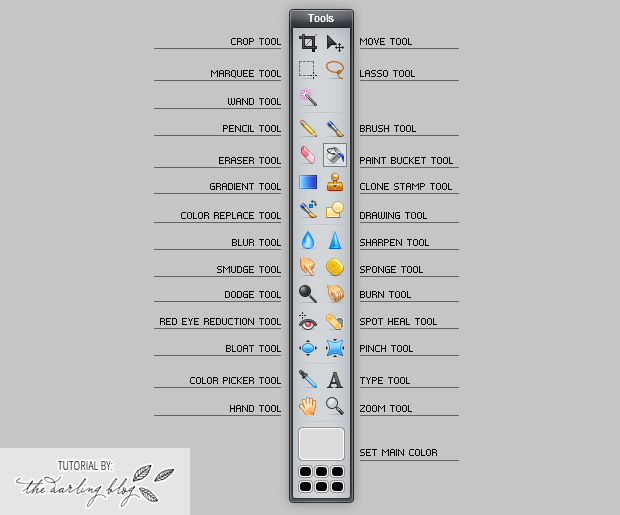
For Step 1, we're going to get familiar with the toolbar. If you're used to Photoshop or Photoshop Elements you can probably skip this step. If you're not, review the image above. For this tutorial, we will be using the Type Tool, Move Tool, Paint Bucket Tool, and Set Main Color. Of course, you can get as creative as you want with your own button but I'm just going to teach you the basics to get you started.


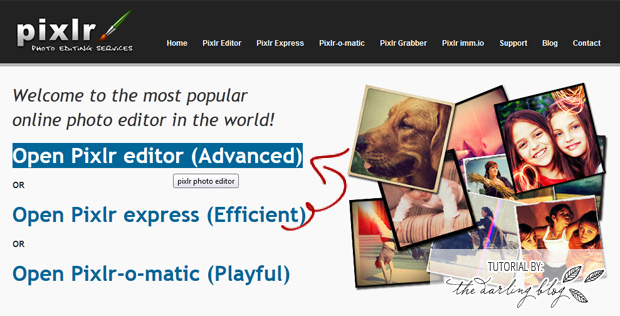
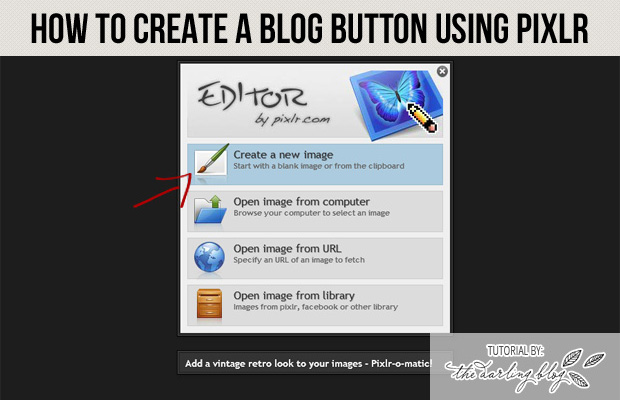
Now that you've familiarized yourself with the Pixlr toolbar, let's get started. Go to pixrl.com and select Open Pixlr editor (Advanced) (<-- or click that link).


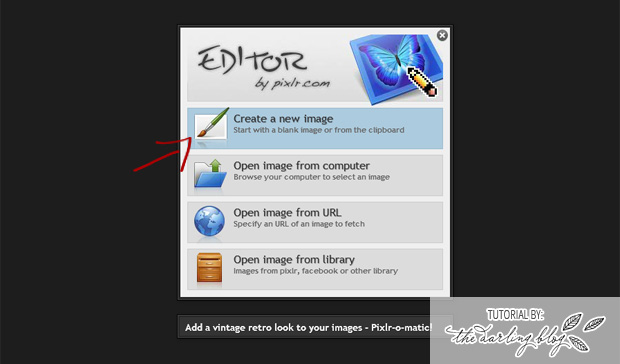
Now, we're going to select Create a New Image to start with a blank canvas. In Step 4 we'll choose the size.


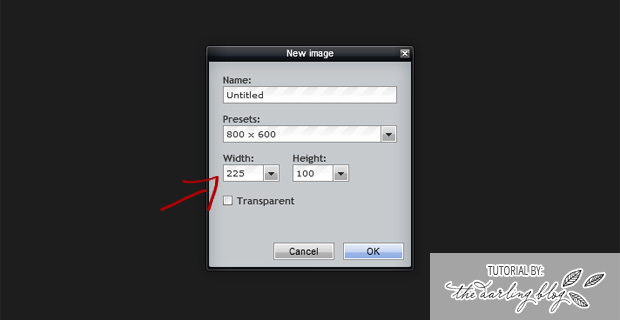
You can choose from a preset size under Presets or you can choose your own size like I did. My sponsor swap button sizes are 225x100 so that's the size I chose. If you'd like to create a button to add to my sidebar, choose this size! Or, pick your own size for your own needs. After you type in both the width and height numbers, click OK.


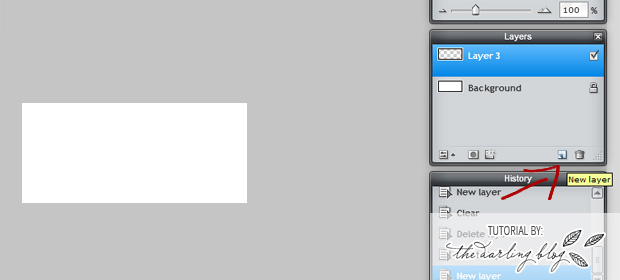
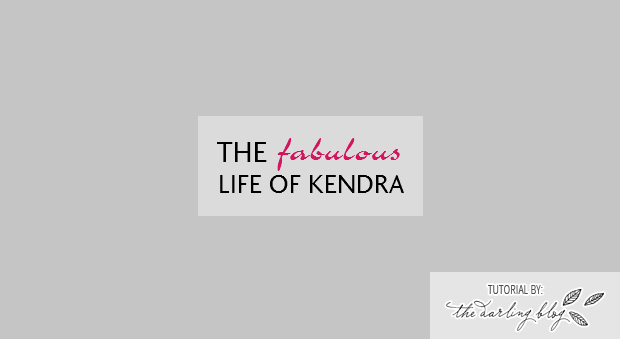
Whew! Now that we got all the specifics out of the way we can get to the good part.  In the top image, I added a new, transparent layer. This part isn't really necessary per se, but it's just something I always do... for whatever reason. Once you do (or don't do) that, you can select the Paint Bucket tool to add a background color for your button. To choose a color, click on the Set Main Color box. If you want to add a pattern or texture, you'll have to select Layer > Open image as layer and then find the background image you want to use. Unfortunately, the fonts you have downloaded on your computer don't show up here. You just have to use the ones provided by Pixlr but they do have some pretty good choices and they also have quite a few choices so surely you're able to find something suitable. Another thing worth mentioning is you will have to create a new text layer for each font, color, or size difference. For the image above, I had to use 3 different font layers: One for THE, one for FABULOUS and one for LIFE OF KENDRA. Just play around, have fun, and be creative as possible!

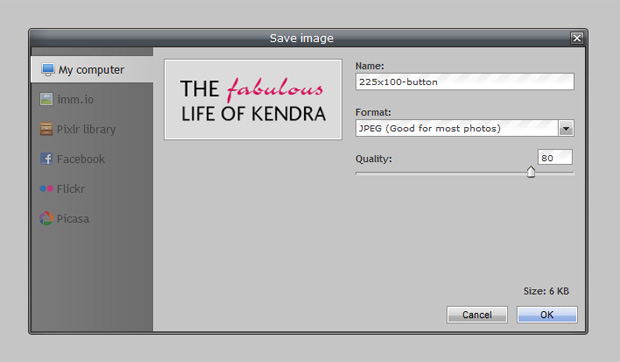
Once you get your button perfected, it's time to save. The cool thing about this is you can save it to your computer, your Flickr account, your Picasa account and more! Just select the location you'd like to save it to, choose the Quality (it defaults to 80 which should be fine for buttons) and click OK then Save. You've now created your button!

Custom Blogger Design: Wheel Fashion Blog

August 5, 2012 // 1 comments


I had designing for Katie's blog Wheel Fashion. She wanted something that was girly vintage with pastel colors with a bicycle in the header. I drew up the bicycle in Illustrator based off an image she had on her blog of her own new bicycle. Be sure to check out Katie's blog!

You Ask, I Listen. What Else Would You Like to See?

July 11, 2012 // 2 comments

I'm not too sure of how many of you find my shop through my blog (or if any of you find my blog through my shop). I've had a lot of people asking me if my BLAIR template was available in a one column layout instead of two. It wasn't then. Even though I do customizations for an extra $10 I refused to do them on this template because I planned on releasing it as a one column in the future and I didn't think it would be right to charge anyone extra for something I was planning to do anyway so I just asked them to hold out a bit.


Well, here it is! Ta da! You asked, I I listened. Best of all, it's $5 cheaper than the two column templates - since much less work is involved on my end :) You can click here to purchase the template or click on the image above.

So tell me.. what else would you like to see? What type of Blogger templates do you look for when you're wanting to spruce up your blog?

Going on Vacation + 20% Off Premade Templates

July 3, 2012 // 0 comments

Hello, hello! I am leaving bright and early tomorrow morning to head for the beach. Aiden is almost 5 and it will be the first time he's been so I'm pretty darn excited! I'm so anxious to see his reaction. He's been begging me to take him for over a year.

In my absence, you will be about to save 20% on anything in my shop! I may even add some more items if I get bored at night while on vacation ;) Visit my shop and use the coupon code INDEPENDENCE to receive your discount.*


* All orders will be processed on Sunday, July 8th and you will receive your template files within 48 hours after this date. Sale ends Saturday, July 7th.

The New POXXIE! Blog and Web Design.

June 1, 2012 // 4 comments


Happy Friday, folks! I've been busy the past few weekends redesigning my blog/web design site and it's finally ready to reveal! I have not accepted any new projects during this time as I've been working on getting my website up and running and client projects finished up so the project queue is completely open.

Head on over to POXXIE and if you're interested interested in a custom blog design or custom website design, fill out the new project request form or contact me for more information & to reserve your spot! If you don't currently have the money to spend on a custom design, there's a small (but growing!) selection of premade Blogger templates available as well.

I thought this would be a good time to participate in the Flaunt it Friday link party and hey, why not flaunt myself? :) Go here to participate! I also linked up with Just Because Friday over at Auniesauce.


My Favorite Free Handwritten Script Fonts

May 17, 2012 // 5 comments

I love handwriting fonts; especially when they're free. I compiled a list today of my favorite handwritten-style script fonts as seen below. Tomorrow I will post a list of my favorite handwritten-style print fonts. Hope you enjoy!


Blog Designs for Kristie Was Here & A Flame of Fashion

March 7, 2012 // 3 comments

Good morning! I'm still working on getting my new blog up and running. I've also been working on getting some premade templates set up for you all to download if you don't have the time or money for a custom design. I haven't had a lot of time leftover to blog but I wanted to show you a couple of custom blog designs I've recently completed.

The first one is for Kristie from Kristie Was Here.


This next one is for Kelley Christiancy from A Flame of Fashion.


Follow my blog with Bloglovin

Custom Blog Design for Lovebird Productions!

February 23, 2012 // 2 comments


I first met Katie about two years ago when she started at the company I work for. Then she got married and up and left me for San Antonio. SHAME!

Before she left she started her own Wedding Videography business and blog adorably titled Lovebird Productions. I love Katie. She's probably one of the nicest girls I've ever met and I was super excited when she told me she wanted her blog redesigned. She knew exactly what she wanted; it's so nice to work with someone like that!

So please, go check out Katie's blog and if you need a Wedding Videographer in the San Antonio area or elsewhere (I bet she likes to travel), definitely take Lovebird Productions into consideration! You can view videos she's already done, take a look at her very reasonable pricing, or just follow and read her blog if you're like me and love all things wedding.

Custom Blogger Design for House Sweet It Is

February 8, 2012 // 9 comments

Good morning! I've recently completed a custom blogger design for House Sweet It Is!

Melissa and her boyfriend are in the process of remodeling their house. I currently live in an apartment and daydream about owning and renovating my own home. Unfortunately, my credit sucks and funds are low so I have to live vicariously through sweet and talented bloggers like Melissa - which isn't so bad :) Melissa and her boyfriend are hoping to continue rehabbing houses once theirs is finished, so check out her blog at http://housesweetitis.blogspot.com and follow along!


My first massage !!

February 4, 2012 // 3 comments

I don't have a lot to say today except I have never had a professional massage. I have asked for a gift certificate to get one for every holiday as long as I can remember and no one has ever gotten me on.

Until last year. My wonderful boyfriend bought me a one-hour massage for my birthday back in August and I have been so busy I kept forgetting to make an appointment until last week. Today is the day! You have no idea how excited I am, haha.

So while I am getting pampered courtesy of my man, you can check out these buttons I designed for Jenn!


Well, I'm off to shave my legs! Have a great day everyone :)

Poxxie Blog Design

February 1, 2012 // 5 comments

Remember a few days ago when I said I was going to start accepting blog design requests? Well, I had so many emails from people interested that I decided to forgo the huge design for it and instead opted on something a bit more simple so I could get it up a lot quicker than I had originally planned. But that's just her little temporary home - an apartment, if you will. She'll be upgrading to a mansion (or at least a townhouse) soon enough.

So who is she?


Go check her out! She loves the attention.

Blog Design

January 26, 2012 // 4 comments

I am very happy to announce that I am now officially accepting blog design requests. I have had quite a few people email me from my blog inquiring about custom designs and was always bummed to have to tell you guys no due to some rules at work.

But the rules have changed (!!)

I am working on getting a separate site up for that and it should be done soon. I will definitely post about it when it is "live" but in the meantime, I wanted to make the announcement just to hopefully get the ball rolling. I will be designing for BLOGS only - not websites.

The new website will have more information, prices, what is offered, etc but if you are interested or have any questions, please feel free to email me at thesinglemomoirs@gmail.com for now :)

Oh and tell your friends!

Free Blogger Template: Photography Blog Theme

January 19, 2012 // 65 comments

Happy Thursday! My goal is to release one free download/graphic/whatever a week. I haven't done too bad so far but we'll see how this goes. Anyway, after two 'personal' blog templates I decided to design a photoblog template for all of you photographers out there.


This template is customized using Blogger's built in Template Designer with minimal HTML/CSS modifications. This means you can easily edit most elements of the design using the Template Designer without having to know a lot of HTML/CSS to do the job. However, to get a certain look some manual HTML/CSS modifications are necessary so just keep that in mind.

Other Theme Features

  • JQuery Header Slideshow - Instructions on how to edit this feature is included in the download file
  • Widget-Based Footer
  • Custom Google Web Fonts used for the menu links, page titles, and post titles
  • Fully editable Photoshop File & Flat Graphic of the "logo" included in the download file
  • Allows photos up to 960px wide in the header slideshow & posts
  • Please Note: Images in slideshow must be cropped to 960px wide, 400px tall.

Free Blogger Template: Sophias Blog

January 9, 2012 // 20 comments


This Blogger template is customized to be mostly compatible with the built-in blogger template. The blog title & description area are text-based by default but a graphic-based header is totally compatible and easy to upload. If you have any questions, feel free to leave them in the comments & I will answer as soon as I can :)

Free Blogger Template: Pink Cupcake

December 27, 2011 // 16 comments

Free Textured Gingham Photoshop Patterns - Retro Spring

October 25, 2011 // 3 comments


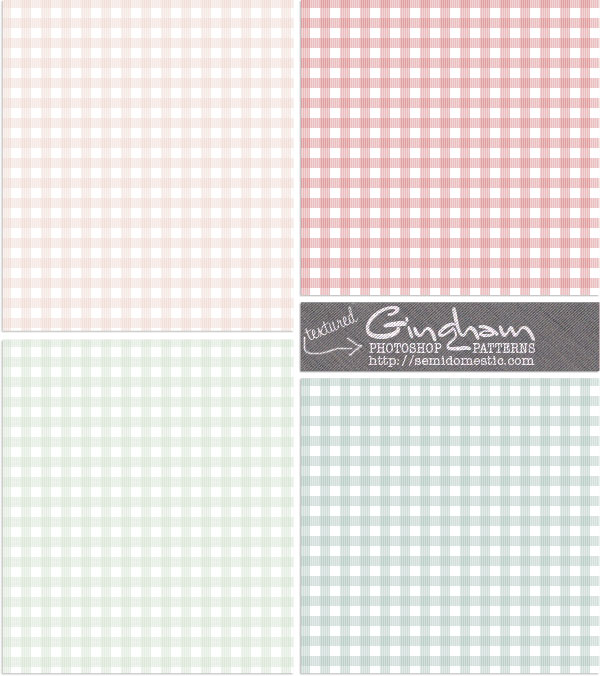
Did you see these gingham photoshop patterns I created for you to download in my previous post? Well these are pretty much the same except they have a subtle textured effect added on. Personally, I like these better. Hope you can find them useful!

Click on the graphic above to download or click here. Please let me know if you find these useful or would like to see other color variations! :)

Patterns may be used in commercial & personal work but MAY NOT be sold alone. If you would like to share this on your own blog you may link to this blog post but you may not host the file on your own servers.

Always Kiss Your Children Goodnight Free 8x10 Printable

July 14, 2011 // 7 comments

I was browsing through quotes last night to use as the title of a blog post I was getting ready to post and ran across this one:


Always kiss your children goodnight - even if they are already asleep.

- H. Jackson Brown, Jr.


I love this quote because it is so true. I bought Jaycee Dugard's book, A Stolen Life: A Memoir, yesterday and finished reading it last night. In the book, she writes that one of the things she remembers most about the day she was abducted was that her mother forgot to give her a goodbye kiss before she left for work that morning. Some parents may not see that as a big deal but it could be something a child never forgets. Whether you are leaving to go somewhere or headed to bed, it never hurts to give your child(ren) one extra kiss. I was inspired to quickly design this poster. Hope you can find it useful! Click the image or link above each image to download the files!

Click Here to Download This File


Pin It button on image hover